
AI
AI that works with clinicians, not instead of them.
Yuktii uses AI to reduce repetitive documentation and speed up follow-up — never to replace clinical judgement.
AI Mode
Run your clinic the way you chat.
Type what needs doing, in plain words, the way you would message a colleague. Yuktii Clinov understands it and does the work, so your front desk clicks less, worries less and has more time for the patient in front of them.
Book in one line
Before: Open the calendar, find the patient, pick a doctor, a time and a visit type.
With AI Mode: Type “book Vijay tomorrow at 3pm with Dr. Karan”. It asks only what is still missing, and you can undo.
Find free time without scrolling
Before: Checking each doctor’s calendar, one by one, while the caller waits.
With AI Mode: Ask for a free slot and tap a time. A small typo is fine, it still understands.
From the door to the doctor
Before: Finding the visit across screens to check someone in and send them through.
With AI Mode: “Priya is here.” Then “send her to the doctor.” The doctor sees her straight away.
New patients, no hunting for forms
Before: Opening the registration screen and remembering every field and consent.
With AI Mode: Say “add a new patient”, fill a short form with the consent options, and they are registered. No appointment needed.
Ask your money questions
Before: Opening reports and filtering them to find who has not paid.
With AI Mode: “Who has not paid in full?” and “close the day” come back as clear cards.
You stay in control
Before: Worrying that a shortcut did something you did not mean.
With AI Mode: Everything it does shows up on screen, and a change made by mistake can be undone in one tap.
What it does
Assist, don't decide
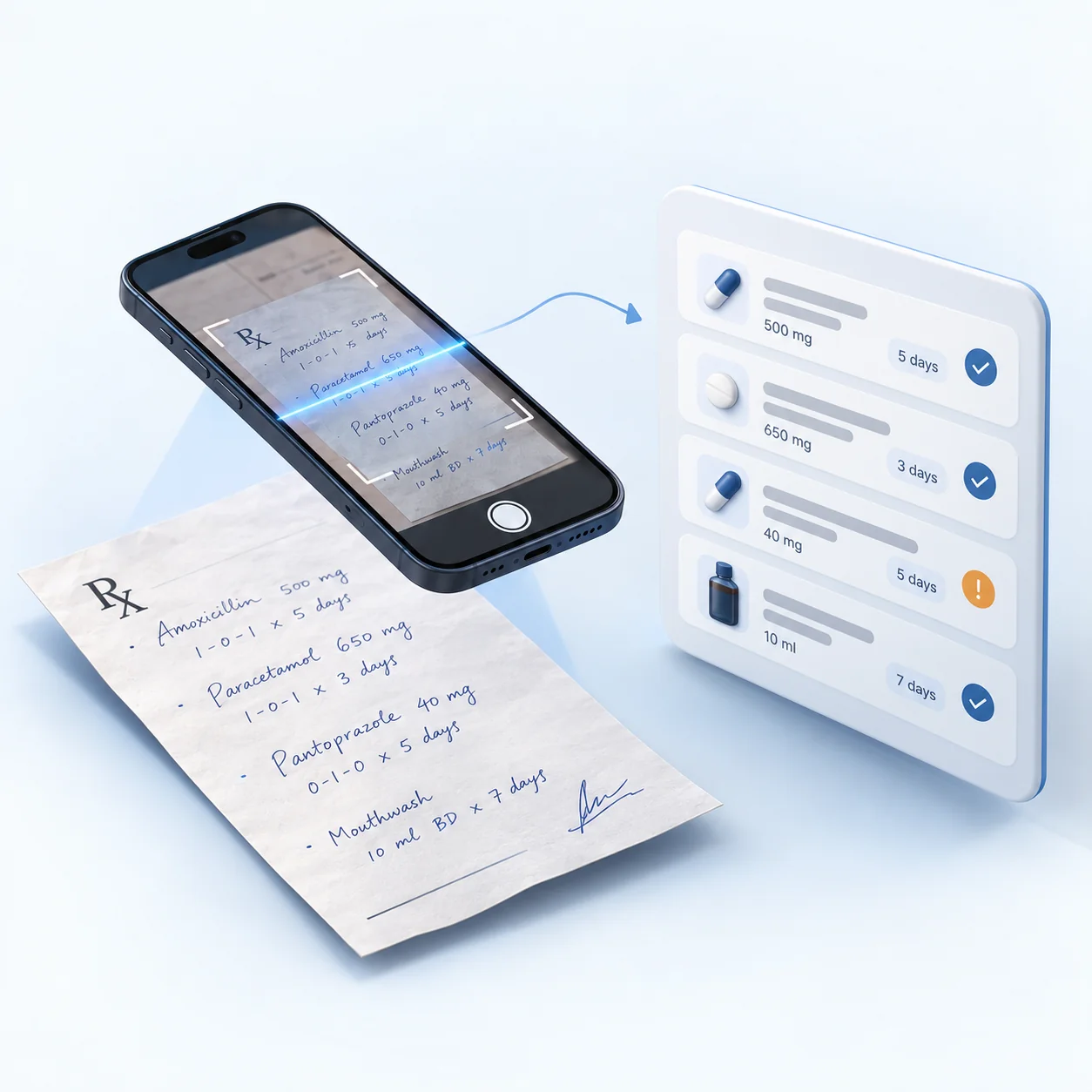
Photo of a prescription → Reviewable medicine list
Photograph a paper prescription and AI reads the medicines, dosage and duration into the prescription form. Unclear items are flagged for review, checked against the patient's allergies, and nothing saves until the doctor confirms.
Voice → Consultation fields
Dictate into the consultation record: say a field name such as "chief complaint" or "diagnosis" and your words are written into that field for you to review.
Patient history → Context
For patients who have given AI-analysis consent, treatments, medicines and recalls are compiled into a one-page summary before the visit.
Clinical data → Documentation
What is recorded during the visit is turned into a clean, consistent record.
Treatment → Documentation
Treatment and procedure steps are documented from what was done.
Follow-up → Automation
Recall lists and reminders are generated from the visit's follow-up plan.
Clinicians remain in control. Every AI-assisted output is reviewed and confirmed before it is saved.
Where it shows up
AI by specialty
See how AI assistance fits a specific specialty's workflow.
AI — common questions
Does Yuktii's AI make clinical decisions?
No. Yuktii's AI assists with documentation, context and follow-up. It does not diagnose conditions or make clinical decisions. The clinician reviews and confirms every AI-assisted output before it is saved or shared.
Can Yuktii read a paper prescription?
Yes. Photograph a paper prescription and AI reads the medicines, dosage and duration into the prescription form. Anything it can't read clearly is flagged for review rather than guessed, and it's checked against the patient's recorded allergies and current medicines. The doctor edits and confirms before anything is saved — a scanned prescription can also be logged as an older, historical record rather than for the current visit.
How does voice dictation work?
In the consultation record you can speak instead of typing. Say the name of a field, such as chief complaint, findings, diagnosis, treatment plan or advice, and what you say next is written into that field; you can also say a medical-history item followed by yes or no. Dictation is in English (India) and writes what you say for you to review and edit. It does not listen to a whole conversation and write the note by itself.
Does Yuktii analyse medical images?
Image interpretation remains with the clinician. Where image analysis is offered for a specialty, it is assistive only and is clearly labelled as such.
Is AI part of Yuktii by default?
Yes, AI-assisted features are part of Yuktii, in two kinds. While you type in a note field, a suggestion based only on the text you have typed there can appear; you accept it with Tab or dismiss it. Features that read a patient's record, such as the patient summary and tooth and treatment suggestions, run only for patients who have given AI-analysis consent. The clinician reviews and confirms everything before it is saved.
Healthcare works differently for everyone. Your software should too.
Discover how Yuktii adapts to the way your specialty and practice work.
Or start for free.
- Free to start
- No credit card
- Every specialty workflow
- Encrypted patient data
- WhatsApp reminders