Chemotherapy — Supportive Care, Chemotherapy Pre-Medication, Neutropenia Prophylaxis, Chemotherapy-Induced Nausea — Breakthrough +4 more.
20 Starter medicine list
Ready in your inventory, so stock and prescriptions use the same names.
Revenue
How Medical Oncology clinics earn more with Yuktii
Yuktii does not promise a percentage. It closes the gaps where Medical Oncology clinics usually lose income: missed follow-ups, empty slots, unbilled work and unpaid dues.
Patients come back on time
Follow-up and recall lists, with WhatsApp reminders, bring Medical Oncology patients back for reviews instead of leaving it to memory.
Nothing you did goes unbilled
Procedure templates such as Chemotherapy — AC Regimen, Chemotherapy — CHOP Regimen, Chemotherapy — FOLFOX Regimen carry a default cost, so each one lands on an invoice.
Fewer empty slots
WhatsApp appointment reminders protect each slot, and the public booking page takes bookings when reception is busy or closed.
Reach past patients
Send one update to patients grouped by the treatment they had. WhatsApp campaigns are on the Solo plan and above; opted-out patients are skipped.
Made for your clinic
Customise Medical Oncology to the way your clinic works
Edit every preset
Choose, reorder and add the quick options your clinic uses for complaints, findings, advice, diagnoses and notes.
Editable in the app
Shape your procedure templates
Rename them, set a default cost, the number of sittings, a colour and the follow-up reminders that suit your clinic.
Editable in the app
Consent your way
Patients sign at reception or through a WhatsApp or email link, with a link expiry you control, or you print the form.
Editable in the app
Your prescription templates
Edit the starter templates or save the regimens you write most, then adjust dose or duration per patient.
Editable in the app
Switch on only what you use
Enable the specialties, specializations and clinical modules your clinic runs, and add Medical Oncology beside others.
Editable in the app
Your letterhead and hours
Add doctor signatures and your clinic stamp to printable documents, and set working hours and branding.
Yuktii gives medical oncology practices cycle-based treatment planning, investigations and reports on the electronic patient record, prescription and supportive-care templates, and reviews scheduled between cycles so nothing is missed.
Your specialty. Your workflow.
Medical Oncology workflows
From Patient Records to Follow-up & Recall — 8 ready-made workflows for Medical Oncology.
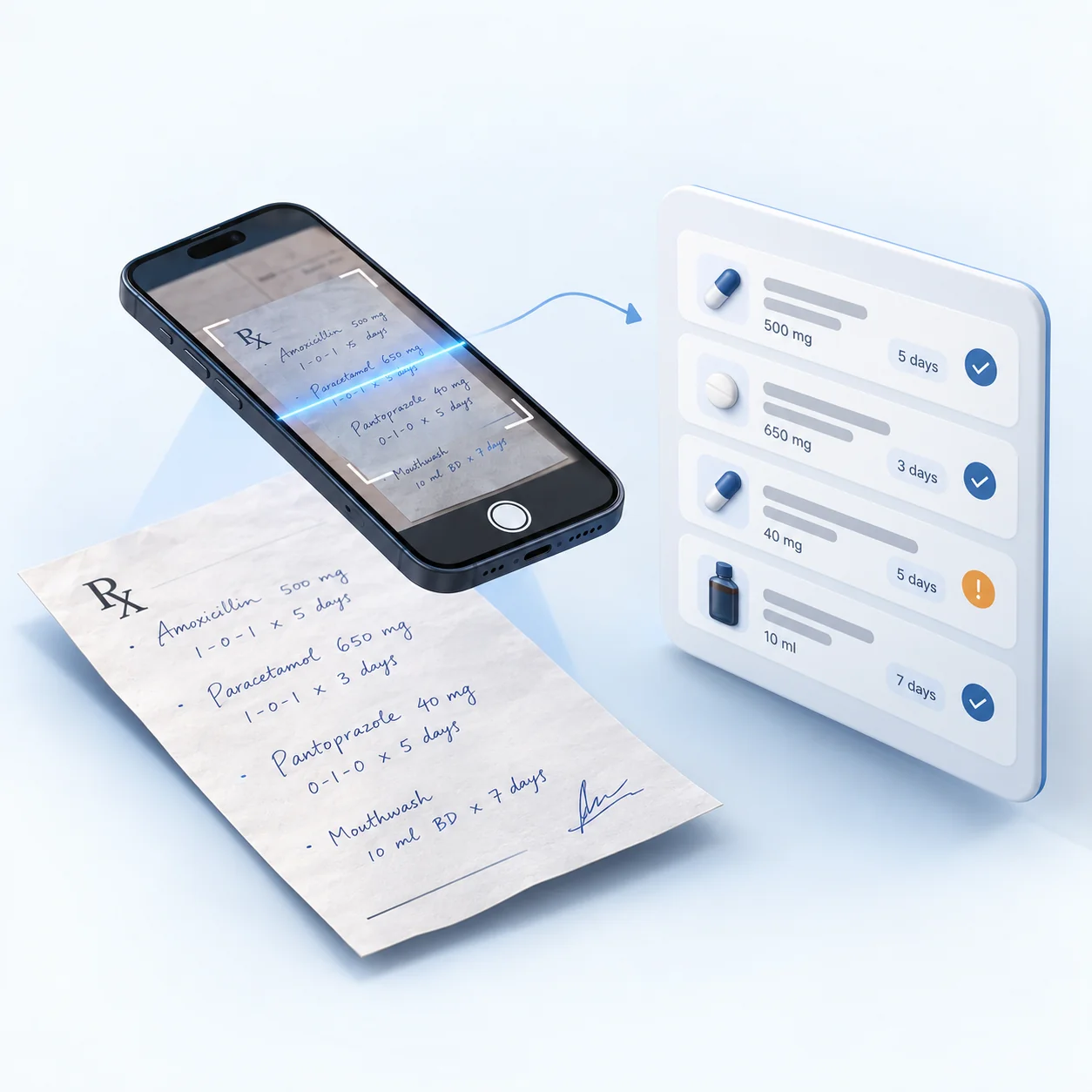
Photograph a paper prescription and AI reads the medicines, dosage and duration into the prescription form. Unclear items are flagged for review — nothing saves until the doctor confirms.
For Medical Oncology practices, Patient Records and Staging & Diagnosis Notes sit on the same timeline as prescriptions, investigations, billing and follow-up — nothing kept in a separate register or spreadsheet.
Faster Medical Oncology documentation
Specialty presets mean Cycle-based Treatment Plan is a few taps rather than paragraphs, with the doctor reviewing before anything is saved.
Fewer missed follow-ups
Review dates and recalls are scheduled from the visit and shown as daily tasks, so Investigations & Response on record does not depend on memory, with WhatsApp reminders so patients actually return.
Clear numbers for the practice
Revenue, patient volume and follow-up performance are built from real clinic activity — no month-end spreadsheet to assemble by hand.
Medical Oncology — questions clinics ask
What is medical oncology practice management software?
It is software for oncology practice that keeps staging notes, cycle-based treatment plans, investigations and response, supportive-care prescriptions, billing and follow-up on one record.
Does Yuktii support cycle-based chemotherapy planning?
Yes. Treatment can be planned as numbered cycles, each with its own review, notes and billing.
Can Yuktii keep staging and response investigations together?
Yes. Reports are uploaded against the patient and the relevant point in treatment and stay on the timeline.
Is Yuktii a medical oncology clinic management software and EMR?
Yes. Yuktii gives medical oncology practices cycle-based treatment planning, investigations and reports on the [electronic patient record](/solutions/emr-software/), prescription and supportive-care templates, and reviews scheduled between cycles so nothing is missed.
Does Yuktii handle patient intake for a medical oncology clinic?
Yes. Registration captures demographics, medical history, allergies, current medications, blood group, referral source, emergency and responsible-party contacts, plus separate consent for data processing, notifications and AI use — entered by your front desk at registration, not a form the patient fills alone beforehand.
Does Yuktii work as a CRM for new medical oncology patient inquiries?
It tracks enquiries before they become patients — name, phone, the treatment asked about, a quote and a status (open, quoted, converted, closed) — with a follow-up date so a lead isn't lost between the first call and the first appointment. Recall and reminder scheduling then continues once they're a patient.
Clinic and patient data is the clinic’s own. A clinic admin can download all of it whenever needed as one Excel workbook, with a sheet each for patients, appointments, treatments, prescriptions, billing, payments, inventory and staff.
Moving from another software?
Send us your existing records as an Excel or CSV file. Our team maps the columns, checks every row for problems and imports your patients, appointments, treatments, prescriptions, invoices and payments after review. An import can be rolled back if something is wrong. Talk to us about switching.
Reports you can download as PDF
Download the overview, today’s snapshot, revenue, expenses, patients, doctors, treatments, medicines, lab cases, stock and doctor commission as PDF reports. The analytics cover clinical, revenue, patient, doctor, inventory and operations views for any period you choose, with AI insights on top.
How it works
Live in three steps
01
Sign up and set up
Create your clinic and pick your specialty in the setup wizard. No card needed.
02
Make it yours
Edit the presets, procedure templates, consent forms and prescription templates, and add your letterhead and hours.
03
See your first patient
Most clinics are live in under 10 minutes, with appointments, records and billing already connected.
Ready to run Medical Oncology on Yuktii?
Medical Oncology: Patient Records and Staging & Diagnosis Notes — ready to edit.